
There is a common belief that the "right" way to learn from a coding tutorial is to type every line yourself. It feels like work, so it feels like learning. Copy-pasting feels like cheating.
But think about what you actually do for most of a two-hour tutorial: pause, rewind, copy a class name, fix a typo, press play, pause again. Your attention is on transcription, not on understanding why the code is written that way. You can retype an entire project and still be unable to build anything similar on your own the next day.
Typing is not the problem. Typing the wrong things is. This guide explains what retyping really teaches, a better four-step loop to use instead, and practical exercises you can start with on your next tutorial.
Quick answer: don't retype boilerplate, config and styling. Get the working code onto your machine (clone, copy or extract it), run it, then make one change the tutorial didn't make. Finally, close the video and rewrite the core function from memory. Read → run → change → recall, once per section of the tutorial.
Why retyping feels productive but teaches less
Retyping gives you a steady stream of small wins: the line compiles, the file is done, the next timestamp arrives. That sense of progress is real, but it measures how well you copied, not how well you understood.
Learning researchers have a name for this trap: the illusion of competence. When the answer is in front of you, recognising it feels the same as knowing it. Following a tutorial line by line is a perfect example. Everything makes sense while the instructor is explaining it, and then the blank editor tomorrow shows you how little of it stuck.
Retyping does help with a few things, especially in your first weeks of programming:
- Syntax muscle memory. Brackets, semicolons, indentation and keyword order.
- Noticing details. You see the import you would have skipped and the argument order you would have guessed.
- Editor fluency. Shortcuts, autocomplete and file navigation.
After those first weeks, the returns drop fast. Retyping import statements, a 40-line Tailwind class list or a generated config file teaches you almost nothing about the concept the tutorial is actually about. And it is expensive. Tutorials take two or three times longer, so you finish fewer of them and abandon more of them halfway.
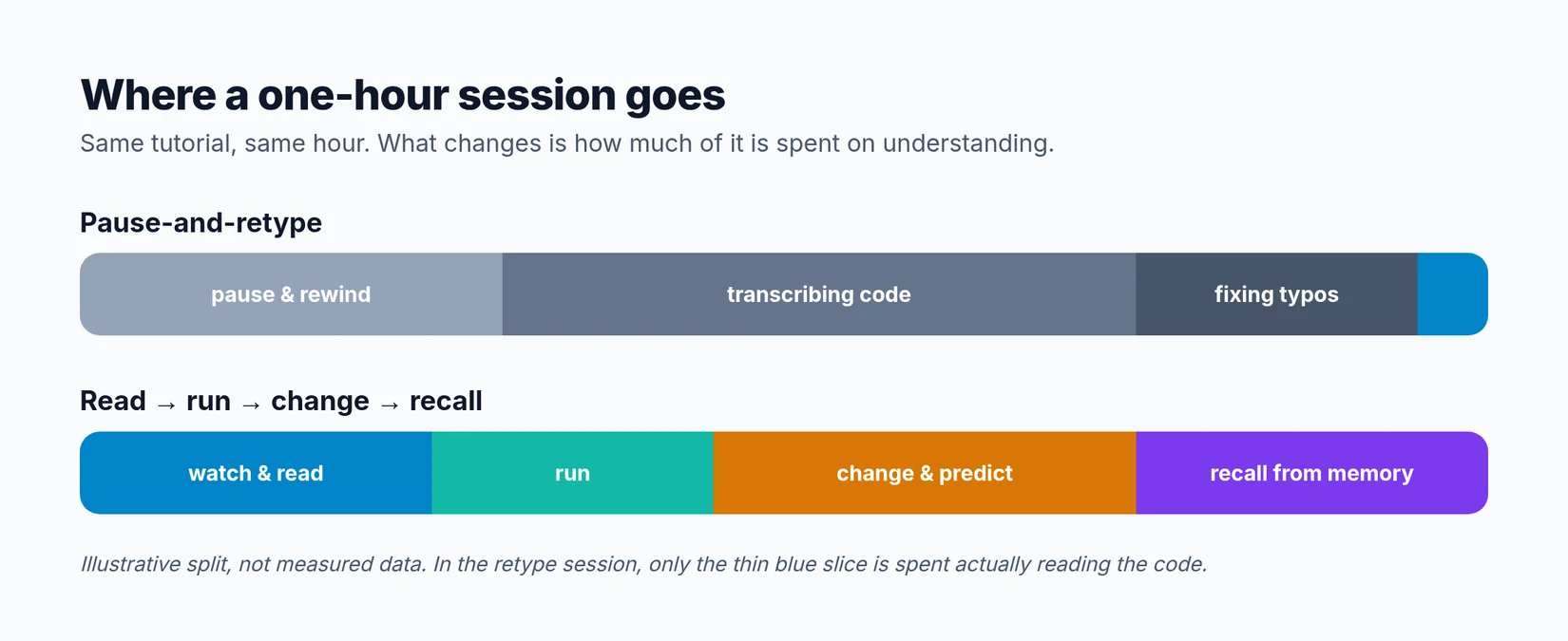 An illustrative split, not measured data: the same hour, spent very differently.
A better approach: read, run, change, recall
Instead of watching and transcribing, work through each section of the tutorial with a four-step loop. A "section" is one chapter of the video, or one feature: the login form, the API route, the database model.
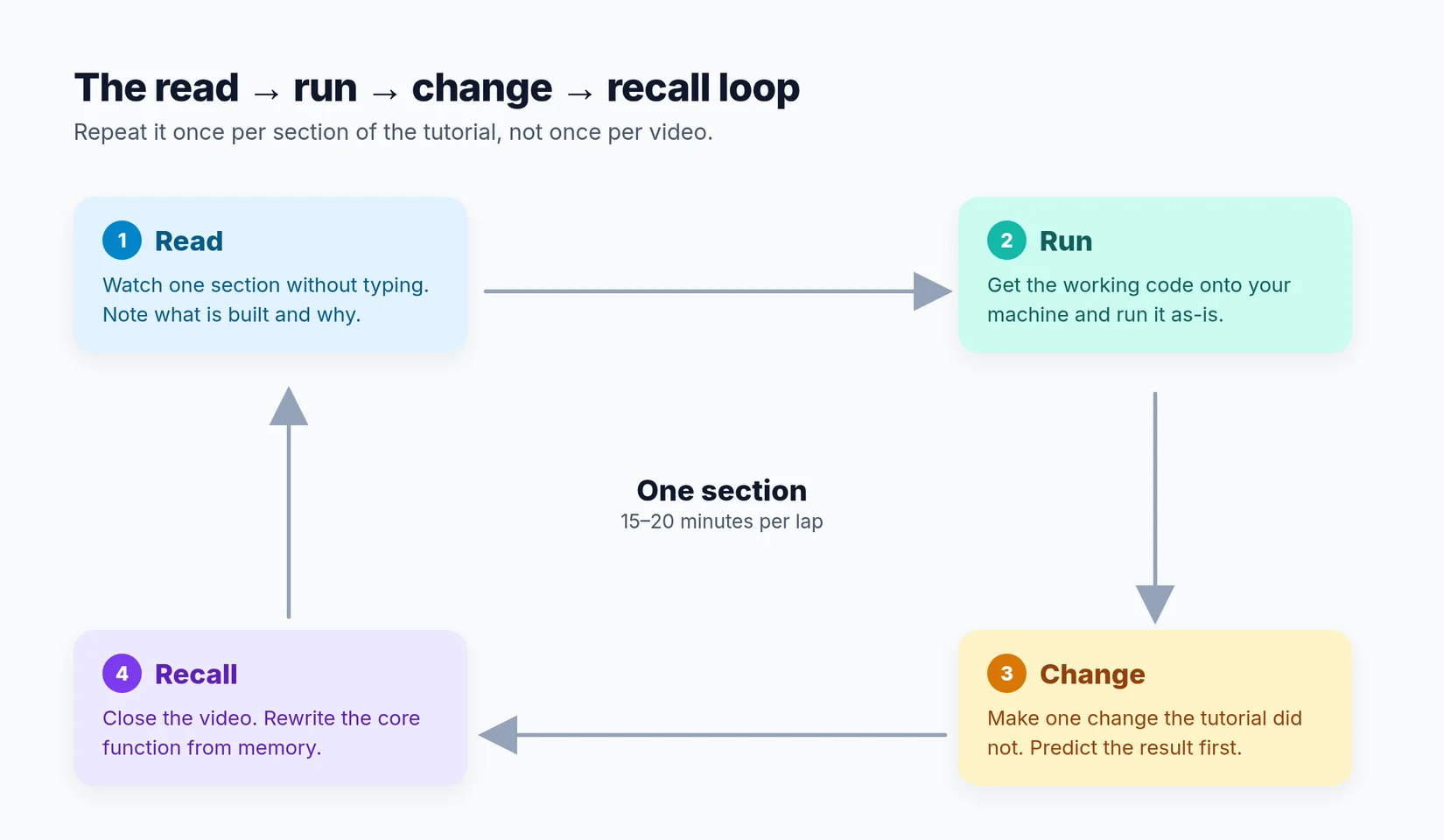 One lap per section of the tutorial, about 15 to 20 minutes each.
1. Read: watch a section without typing
Watch one chapter all the way through with your hands off the keyboard. Focus on what the instructor is building and why they made each decision. Why a hook instead of a class? Why this table structure? Why validate here and not there?
Write down one or two sentences, not a transcript. A good note sounds like "the form state lives in the parent so both children can read it", not "line 14: const [value, setValue] = useState('')".
If the video has chapters, use them. They are natural section breaks. If it doesn't, the transcript is a quick way to find where one feature ends and the next begins.
2. Run: get the working code onto your machine
Now get the code for that section without retyping it. Clone the instructor's repo if there is one, copy it from an online editor, or extract the project. How to get code from a YouTube tutorial covers every option.
Then run it, unchanged. This step matters more than it looks. A project that runs is a safe starting point: every change you make from here has a clear before and after. If it doesn't run, fix that first. How to set up a project from a tutorial covers the usual steps.
While it runs, read the code that matters for this section the way you would read a colleague's code. Follow the data. Find where the request is handled. See where the state changes. Reading working code is a real skill, and it is the one you will use most at work.
3. Change: make one change the tutorial didn't
This is where most of the learning happens. Make one change the tutorial didn't make, and predict the result before you run it.
- Rename something important and fix everything that breaks.
- Add a field to a form and carry it all the way through to the database.
- Break something on purpose and read the error message.
- Remove a line and see what stops working.
If your prediction is right, you understand that part. If it is wrong, you have found exactly where to slow down. Either way, you learn more from one predicted change than from ten retyped files.
4. Recall: rewrite the core idea from memory
Now type something, but only the important part. Close the tutorial, close the extracted code, and rewrite the one function, component or query the section was really about, from memory.
This is active recall, also called retrieval practice: pulling information out of your memory instead of reading it again. It is one of the most consistently recommended study techniques in learning science, and it is uncomfortable for the same reason it works. You will get stuck. That moment of being stuck is the part that makes it stick.
When you are done, compare your version with the original. The differences are your notes for this section.
What to type yourself, and what to skip
The rule of thumb is simple: spend your typing on the idea the tutorial is teaching, and get everything else some other way.
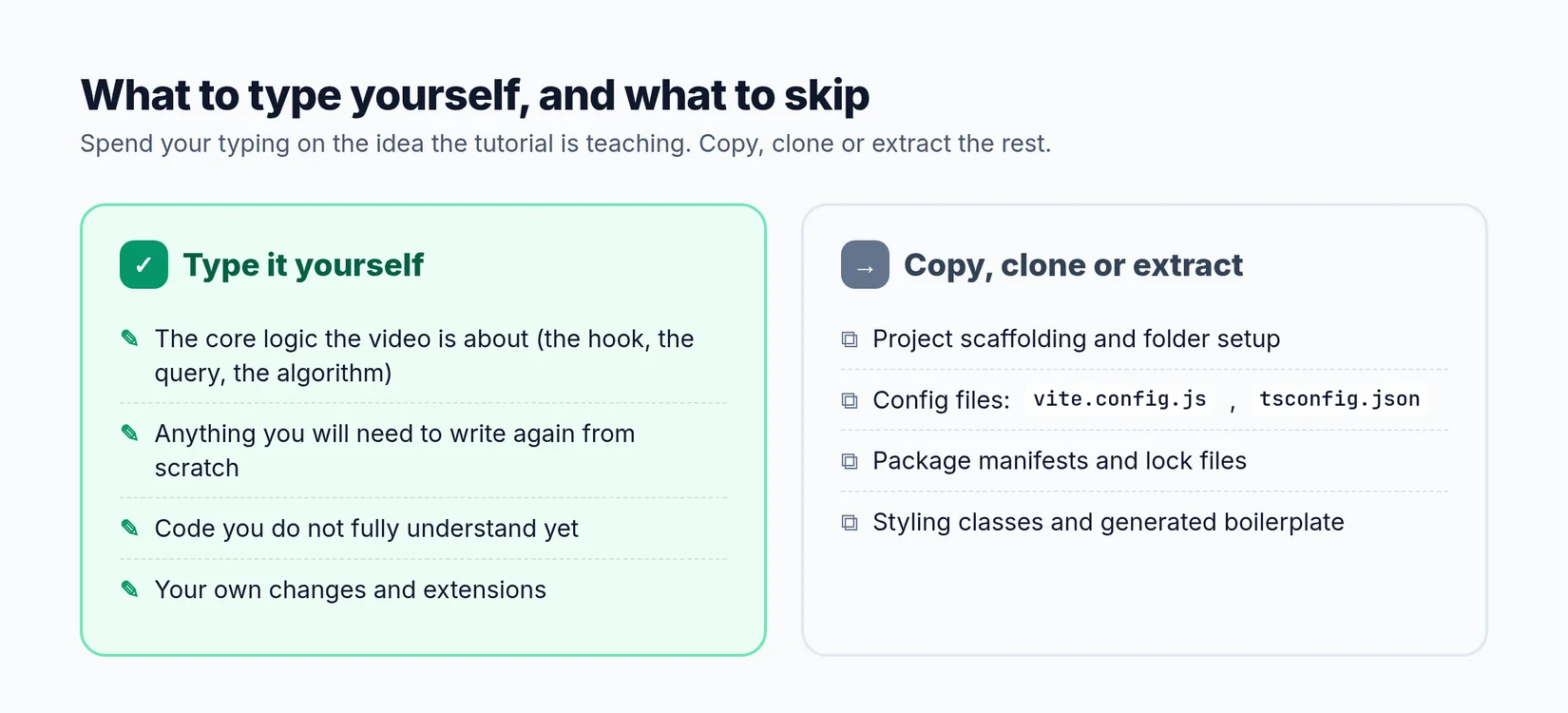 Type the concept. Copy, clone or extract everything around it.
| Type it yourself | Skip it (copy, clone or extract) |
|---|---|
| The core logic the tutorial teaches | Project scaffolding and folder setup |
| Anything you will need to write again from scratch | Config files like vite.config.js or tsconfig.json |
| Code you do not fully understand yet | Package manifests and lock files |
| Your own changes and extensions | Styling classes and generated boilerplate |
There is one exception: if you are in your first few weeks of programming and still fighting syntax, retyping short, simple examples is useful. Once the syntax stops being the hard part, switch to the loop.
"Change one thing" ideas for your stack
Not sure what to change? Here are starting points that work for most tutorials in each stack. Pick one per section.
React and Next.js
- Add a loading state and an error state to a component that fetches data.
- Move a piece of state up to the parent, or down into a child, and fix what breaks.
- Turn a hard-coded list into one that comes from props.
- Add a filter or search box to a list the tutorial renders.
More ideas in the React tutorial guide.
Python
- Add input validation to a function and raise a clear error for bad input.
- Replace a hard-coded value with a command-line argument or an environment variable.
- Write one test with
pytestfor the core function. - Save the output to a file (CSV or JSON) instead of printing it.
More ideas in the Python tutorial guide.
Backend APIs (Node, Laravel, Django)
- Add a new field to a model and expose it through the API.
- Add pagination to a list endpoint.
- Return a proper 404 when a record doesn't exist.
- Add a simple rate limit or authentication check to one route.
Any stack
- Write a short README explaining how the project works, in your own words.
- Deploy it somewhere free and fix whatever breaks in production.
- Rebuild the smallest version of the project from an empty folder, using only your notes.
A one-hour study session plan
If you like structure, here is how a one-hour session with a coding tutorial can look:
| Time | Step | What you do |
|---|---|---|
| 0 to 10 min | Read | Watch one section with your hands off the keyboard. Write two sentences about what was built and why. |
| 10 to 20 min | Run | Get the code, run it, and read the files for this section. |
| 20 to 40 min | Change | Make one change from the list above. Predict the result before every run. |
| 40 to 55 min | Recall | Close everything. Rewrite the core function from memory, then compare. |
| 55 to 60 min | Commit | Commit to git with a message that says what you learned, not just what you changed. |
That is one section per hour. It sounds slow compared with watching three chapters in the same time, but by the end of the week you will have a working project you understand, changes you made yourself, and code you can write without the video.
Tools that remove the retyping
You can always do the "get the code" step by hand, but it is often the slowest part of a tutorial. YouExtractor extracts the full project from a public YouTube coding tutorial: the files and folders, the dependencies, a written setup guide and a Guided Learning Roadmap of the video's steps. Your roadmap progress is saved, so you can work through a long course one section at a time.
Each extraction is saved to your Learning Library, with the stack and the number of code files. When you come back to a tutorial a week later, the code is still there, so you can go straight back to the change and recall steps.
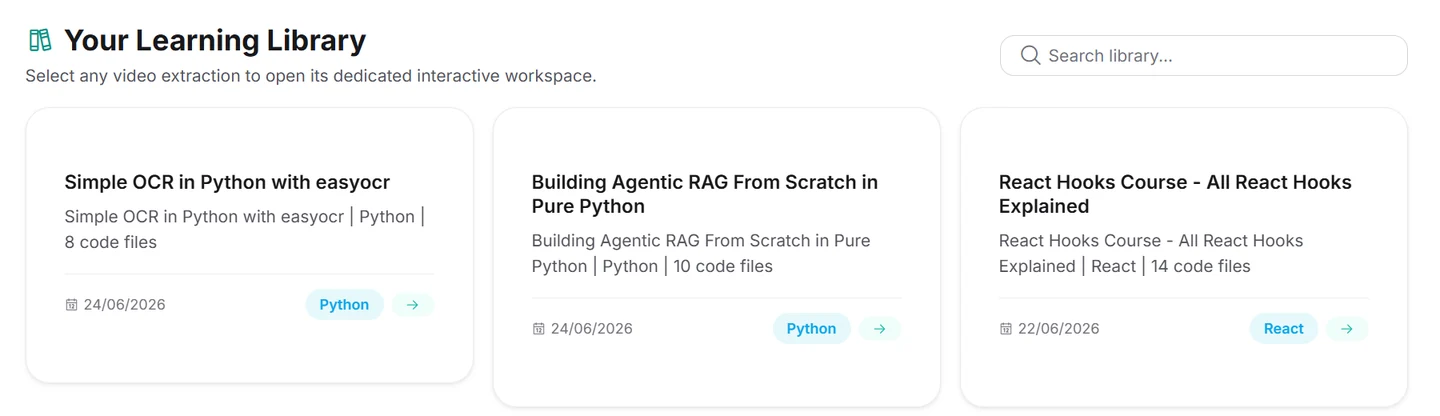 Every extraction stays in your Learning Library, ready for the next session.
Inside each project, the AI Copilot knows the exact tutorial you watched. That makes it useful for the change step: ask "what would break if I moved this state into the parent?" before you try it, and compare its answer with your own prediction. You can download the project as a ZIP or push it to GitHub when you are done. YouExtractor works with public videos that have captions, and every account gets one free extraction, so you can try it with this method on your next tutorial.
Common mistakes with this method
- Skipping the run step. Changing code you have never seen working means you can't tell your bugs from the tutorial's.
- Changing too much at once. One change, one prediction, one run. If you change three things and it breaks, you learn nothing about any of them.
- Recalling with the code open. It is tempting to glance at the original "just for the syntax". Don't. Get stuck, then check.
- Treating the recall as a test. It's practice. Getting it wrong and then comparing is the whole point.
- Watching the whole video first. One section at a time. By the end of a two-hour video, the first chapter is already gone.
The goal is projects you can explain
At the end of a tutorial, ask yourself two questions: can I explain how this project works, and could I build a smaller version without the video? If the answer is yes, you learned from it, no matter how much you typed. If the answer is no, retyping more would not have fixed it. Reading, running and changing the code would have.
Frequently asked questions
Isn't copy-pasting tutorial code cheating?
Only if copying is the last step. Copying the boilerplate so you can spend your time understanding, changing and recalling the important parts is a better use of the tutorial than retyping it. What matters is whether you can explain and rebuild the core idea afterwards.
Should beginners retype code?
In your first few weeks, yes, for short and simple examples. It builds syntax familiarity. Once syntax is no longer what slows you down, switch to the read, run, change, recall loop.
How do I know if I really understood a section?
Two tests: you can predict what a change will do before running it, and you can rewrite the core function from memory. If you can do both, you understood it.
What if the tutorial has no source code?
You can still use the loop, but the run step needs the code first. How to get code from a YouTube tutorial covers five ways to get it, from the description link to extracting the full project.
How long should each section take?
Around 15 to 20 minutes for a typical chapter, longer for dense ones. If a section takes more than an hour, split it into smaller pieces.