
Every network call your code makes is a promise to wait. The question is how long.
For most of us, timeouts are one number we type once and forget: timeout: 30, timeout=180, proxy_read_timeout 600s. It feels like a small detail. But when I sat down and actually traced every timeout and retry in YouExtractor, the app that turns YouTube coding tutorials into runnable projects, I found that one slow AI provider could keep a user waiting for about 20 minutes before they saw an error.
No single number was wrong. Each one looked reasonable on its own. The problem was how they combined.
This article is about that idea: a timeout is not a number, it's a budget. You have a fixed amount of time to answer a user, and every layer, retry and fallback spends part of it.
Short version: set a timeout on every network call, because many clients have none by default. Make every inner timeout shorter than the one around it. Retry only errors that are actually temporary, and only at one layer. Pass a deadline down instead of giving each call its own fresh timer. And if the work takes minutes, don't hold an HTTP request open for it at all.
Why timeouts matter more than you think
The obvious reason for a timeout is the user: nobody wants to stare at a spinner forever. The less obvious reason is more important. A request that is waiting is still holding something.
While your code waits on a slow API, it holds a worker process, a database connection, a socket, some memory. If the API gets slow for everyone at once, every request piles up waiting on it. Soon you have no free workers left, and requests that have nothing to do with that API start failing too.
There is a simple formula behind this, called Little's Law:
requests in flight = requests per second × seconds per request
If you get 10 requests a second and each one takes 0.5 seconds, you have about 5 in flight. If a dependency hangs and each request now takes 60 seconds, you have 600 in flight. Same traffic, 120 times the load. A timeout is what puts a ceiling on that second number.
So a timeout isn't mainly about being polite to users. It protects the rest of your system from one slow part.
The default is often "wait forever"
The first surprise: many HTTP clients have no overall timeout unless you set one.
- Python
requests: no timeout by default. A call can hang indefinitely. The docs recommend always passing one. - Go
http.Client: a zeroTimeoutmeans no timeout. - Node.js
fetch: no overall deadline. You add one yourself with anAbortSignal. - Laravel's HTTP client: sets a 30-second timeout for you, and a 10-second connect timeout. That's a sensible default, but it's still a default, not a decision.
If you take one thing from this article: search your codebase for every outgoing call and make sure each one has a timeout you chose on purpose.
# Python: (connect timeout, read timeout) in seconds
requests.get(url, timeout=(3.05, 27))
// Node.js 18+
const res = await fetch(url, { signal: AbortSignal.timeout(5000) });
// Go
ctx, cancel := context.WithTimeout(ctx, 5*time.Second)
defer cancel()
req, _ := http.NewRequestWithContext(ctx, "GET", url, nil)
// Laravel
Http::connectTimeout(5)->timeout(30)->get($url);
There isn't just one timeout
"Timeout" usually means several different timers. Mixing them up is how you end up with a 30-second setting that somehow lets a request run for five minutes.
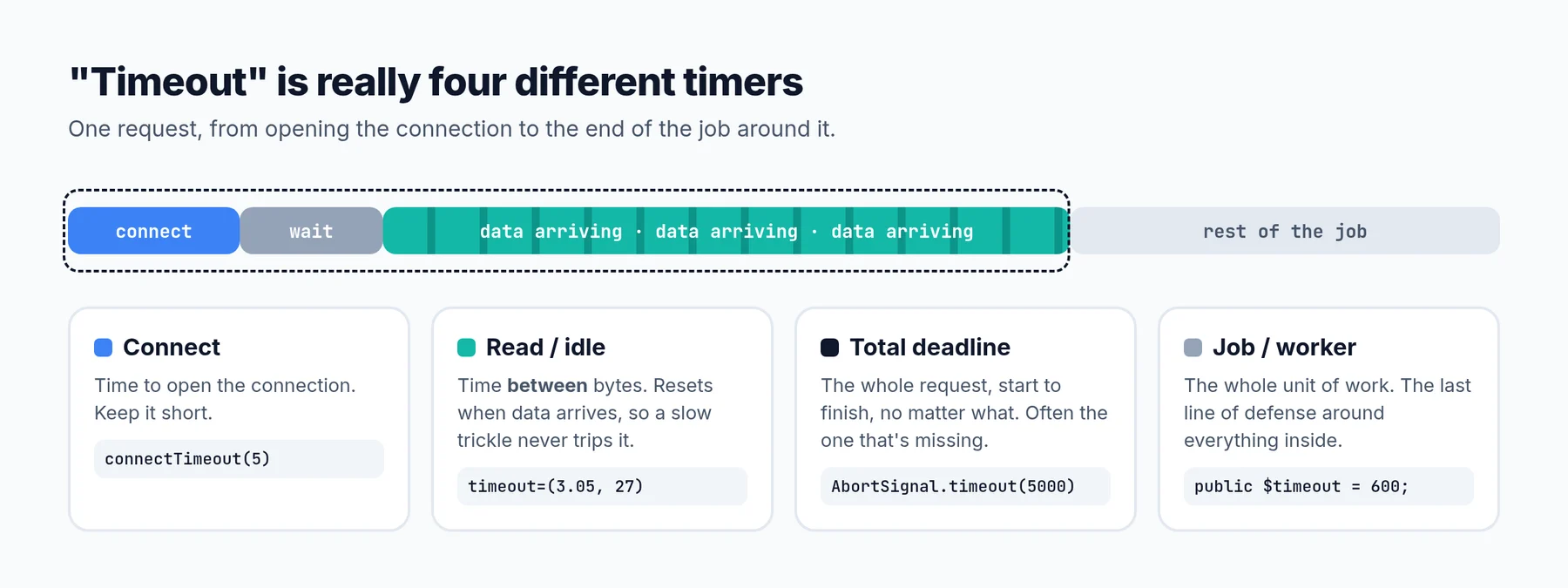 Most bugs come from setting one of these and assuming it covers the others.
- Connect timeout. How long to wait to open the connection. This should be short, usually a few seconds. If you can't even connect, waiting longer rarely helps.
- Read (idle) timeout. How long to wait between pieces of data. Many clients reset this timer every time a byte arrives. A server that sends one byte every 25 seconds will never trip a 30-second read timeout, even if the full response takes ten minutes.
- Total deadline. How long the whole request may take, from start to finish, no matter what. This is the one you usually actually want, and the one most often missing.
- Job or worker timeout. How long the whole unit of work may run: the queue job, the PHP process, the Lambda. It's the last line of defense, and it covers everything inside it.
That second point catches a lot of people, especially with streaming AI APIs. An LLM that streams tokens slowly keeps resetting the read timer, so the read timeout never fires. If you need a hard limit, you need a total deadline.
The multiplication problem
This is the part that surprised me most.
YouExtractor sends each tutorial transcript to an AI model to plan and write the project. To be resilient, the code does what a lot of us do: it adds a timeout, adds retries, and falls back to another provider if one fails. Each piece looks sensible:
- Each AI request has a 180-second timeout, because large code generations can be slow.
- Each request is attempted twice if it fails.
- An extraction makes two or three AI calls (a plan, the code, and sometimes a repair step).
- If a provider fails, it falls back to the next of four providers. One of them also tries up to five models, with its own retry loop.
- The whole job can be retried once by the queue.
Now multiply. Just the first provider, with two attempts of 180 seconds plus a 3-second pause, can take about 363 seconds for one call. Two calls is already past ten minutes. If every layer ran to its limit, the theoretical worst case for one extraction is measured in hours.
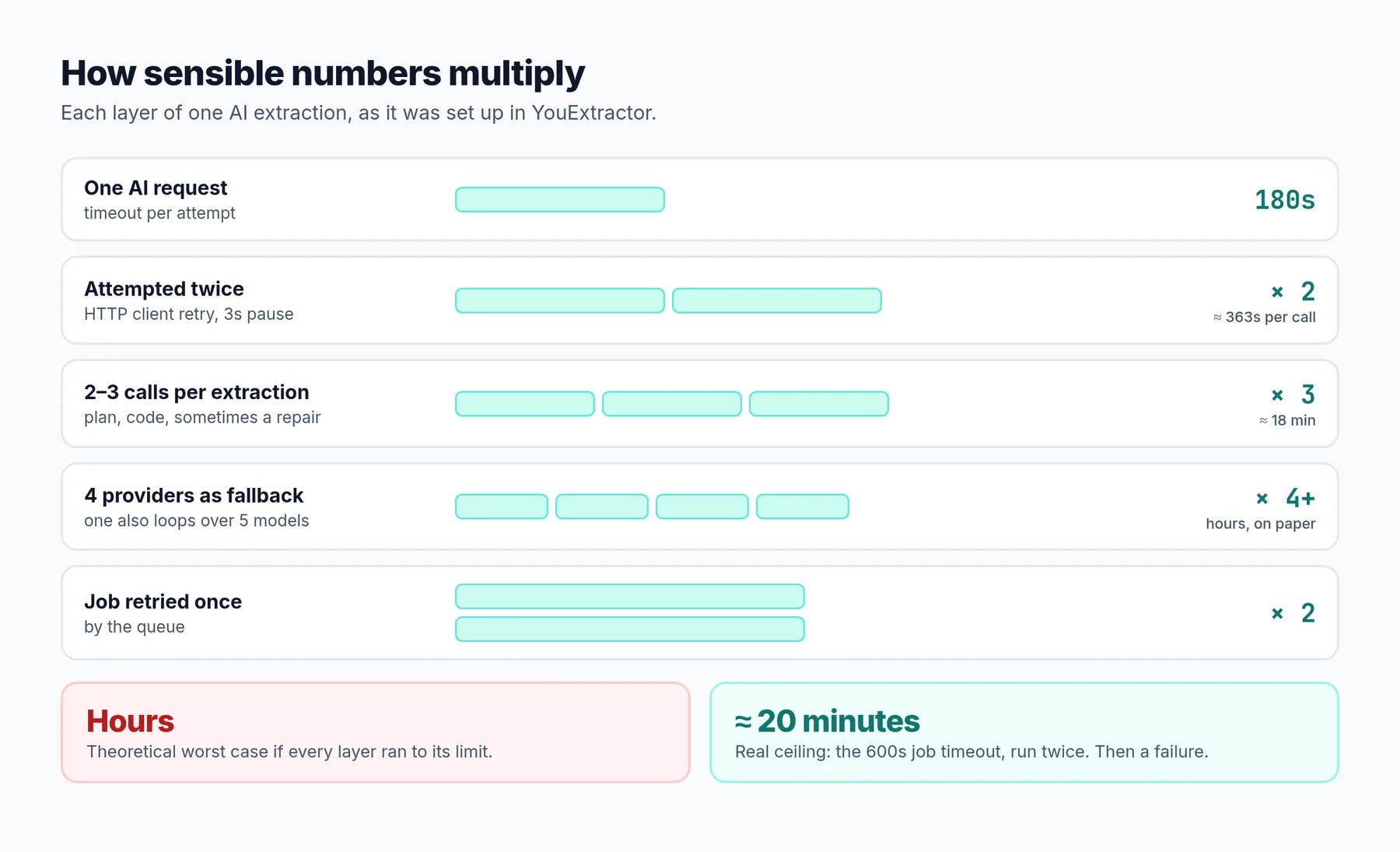 Each layer is reasonable. Together they're not.
What actually stops it is the outermost timer: the queue job is killed after 600 seconds. Then the job is retried once, and that can take another 600 seconds. So the real ceiling is about 20 minutes of waiting, followed by a failure. The user doesn't get a fast error. They get a slow one.
The lesson isn't "180 seconds is too long". It's that nobody owned the total. Each layer picked its own number without knowing about the others.
This is also a known way for systems to fall over. When a dependency gets slow, retries at every layer multiply the traffic sent to it, right when it's least able to handle it. A small slowdown turns into an outage. This is often called a retry storm.
Rule 1: inner timeouts must be shorter than outer ones
Picture your request as a set of boxes, one inside the other. The browser waits on your load balancer. The load balancer waits on your app. Your app waits on the database and on other APIs.
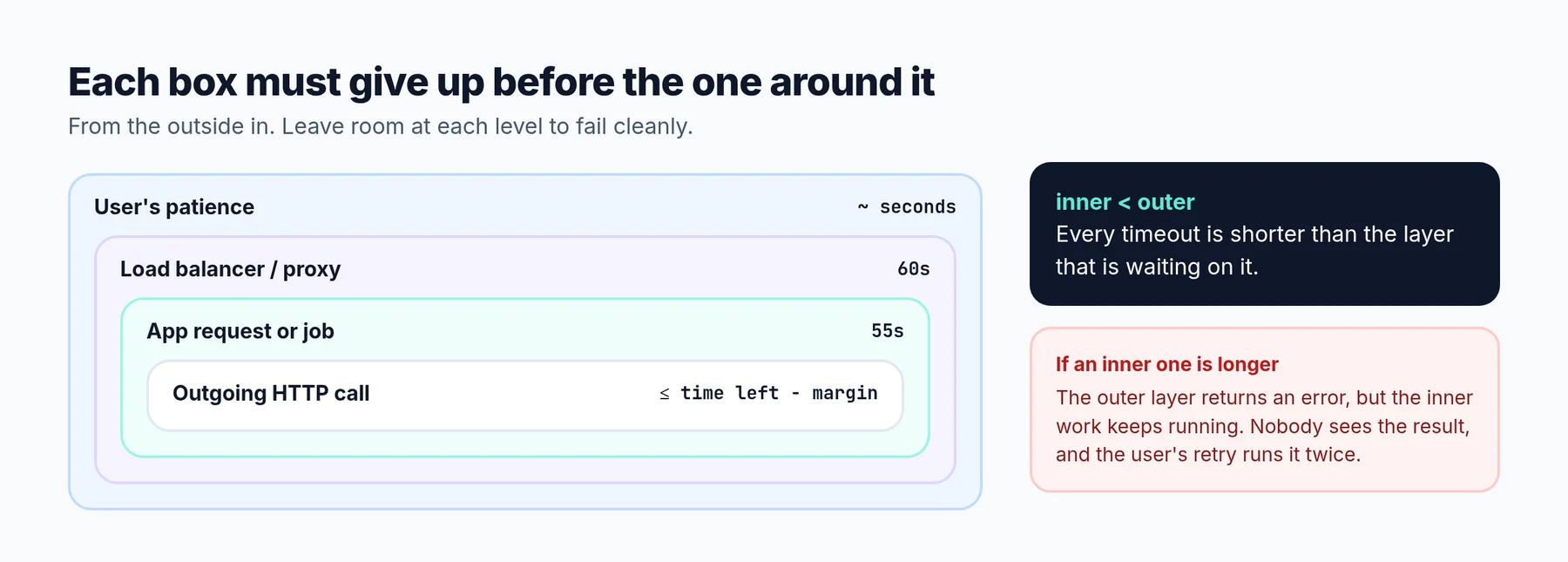 If an inner box can outlive the outer one, you get work that nobody is waiting for anymore.
If an inner timeout is longer than the one around it, two bad things happen:
- The outer layer gives up and returns an error, but the inner work keeps running. You pay for compute, API calls and database locks that no one will ever see the result of.
- The user retries, and now that abandoned work is running twice.
So the rule is simple: each layer's timeout should be a bit shorter than the layer around it, with enough room left to handle the failure and return a clean error.
A Laravel-specific trap: retry_after
If you use Laravel queues, there is one more pair of numbers to line up. A job has a timeout (how long it may run). The queue connection has a retry_after (how long before the queue assumes a job is lost and hands it to another worker).
Laravel's documentation says retry_after should always be longer than your longest job timeout. If it isn't, a job that is still running can be picked up again by a second worker, and it runs twice. The default retry_after for the database and Redis queues is 90 seconds. If your jobs are allowed to run for ten minutes, that default is too short. With a single worker you may never notice. The day you add a second worker, you start seeing duplicate work.
Rule 2: pass a deadline down, not a fresh timer
The fix for the multiplication problem is to stop giving every call its own fresh timeout. Instead, decide the total budget once, at the top, and let every call spend from it.
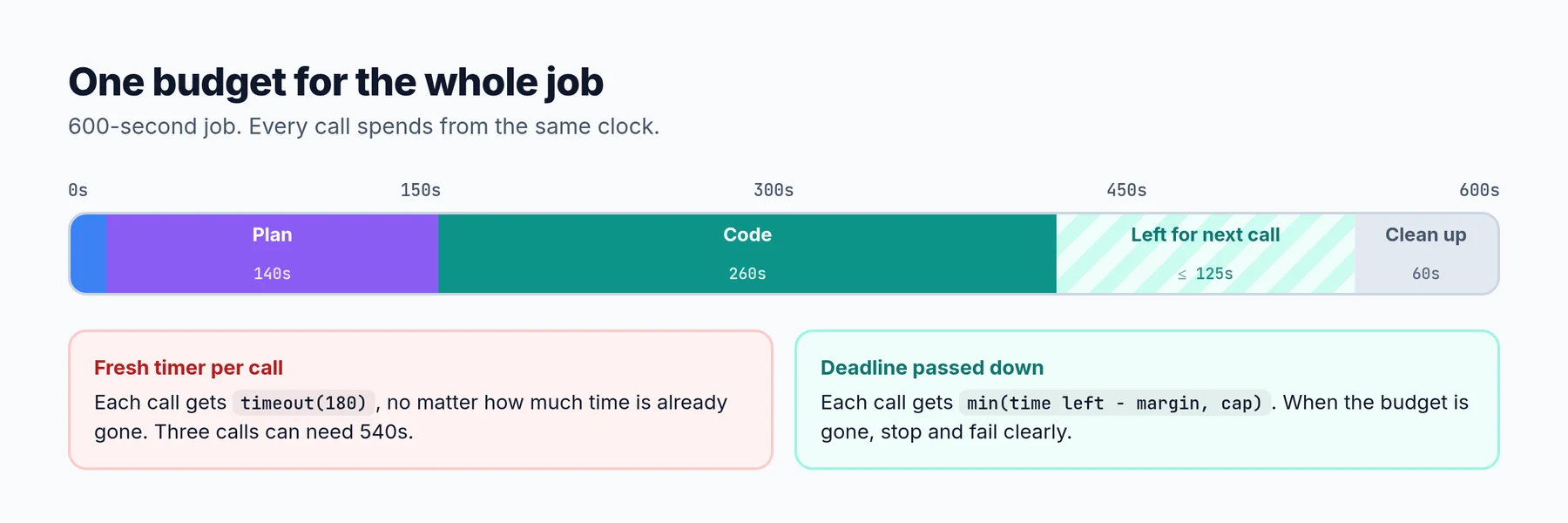 Every call asks "how much time is left?" instead of "what's my timeout?"
In practice it looks like this:
// Decide the budget once, when the job starts.
$deadline = microtime(true) + 540; // job timeout is 600, keep 60s to clean up

function remaining(float $deadline): float {
    return $deadline - microtime(true);
}

// Before each call, give it what's left, capped at a sensible maximum.
$left = remaining($deadline);
if ($left < 10) {
    throw new RuntimeException('Out of time budget, failing fast.');
}

$response = Http::connectTimeout(5)
    ->timeout((int) min($left - 5, 150))
    ->post($url, $payload);
Now it doesn't matter how many retries or fallbacks you add. When the budget runs out, everything stops, and you still have time left to mark the job as failed, refund the user's credit and show a clear message.
This is the same idea as Go's context.WithDeadline or gRPC deadlines: the deadline travels with the request, and every layer can check how much time is left. Many languages make this easy. You just have to use it.
Rule 3: retry less, and retry smarter
Retries are useful. A dropped connection or a brief 503 often succeeds on the second try. But a retry is not free. It spends your time budget, and it adds load to a system that might already be struggling.
A few rules that would have prevented most of my problems:
- Only retry errors that are temporary. Connection failures, timeouts,
429 Too Many Requests,502,503and504. Don't retry a400 Bad Requestor a401 Unauthorized. It will fail the same way every time, just slower. A retry condition likefn ($e) => trueretries everything, including the errors that can never succeed. - Respect
Retry-After. If a rate-limited API tells you when to come back, wait that long instead of guessing. - Use exponential backoff with jitter. Wait longer after each failure (1s, 2s, 4s), and add some randomness so a thousand clients don't all retry at the same moment.
- Retry at one layer only. If the HTTP client retries, the service shouldn't, and the job shouldn't either. Pick the layer that knows the most about the error, usually the one closest to the call.
- Only retry what is safe to repeat. Reading data is safe. Charging a card or sending an email is not, unless you use an idempotency key so the server can recognize the duplicate.
- Cap the total. "Three attempts" isn't a limit if each attempt can take three minutes. The limit is the deadline.
// Retry only temporary failures, with backoff, and stay inside the budget.
Http::connectTimeout(5)
    ->timeout((int) min(remaining($deadline) - 5, 150))
    ->retry(
        [1000, 3000],          // wait 1s, then 3s
        when: fn ($e) => $e instanceof ConnectionException
            || in_array($e->response?->status(), [429, 502, 503, 504]),
        throw: false,
    )
    ->post($url, $payload);
How to pick the actual numbers
"Use a sensible timeout" is easy to say. Here is how to get a real number:
- Measure first. Look at the real latency of the call over a week. You care about the slow end: the 99th percentile (p99), not the average.
- Set the timeout a bit above the slow end. A common starting point is around two to three times the p99. If an API usually answers in 300 ms and p99 is 1.2 seconds, a timeout of 3 to 4 seconds catches real hangs without cutting off normal slow requests.
- Keep connect timeouts short. A few seconds is plenty for most services in the same region.
- Work backwards from the user. If a page should load in 5 seconds, every call inside it has to fit in that, together.
- Revisit them. Latency changes as your traffic and providers change. A number from two years ago is probably wrong now.
AI APIs are the awkward case, because a long generation can honestly take a minute or more. For those, two things help: stream the response, so you can use a shorter idle timeout and still allow long answers, and keep a total deadline on top so a stream that stalls doesn't run forever.
The best timeout is not holding the request at all
Some work just takes minutes. Turning a two-hour tutorial into a full project is one of them. No timeout setting makes that a good fit for a single HTTP request.
YouExtractor's first version did the extraction inside the web request, and long videos ran into 60-second HTTP timeouts. The fix wasn't a bigger number. It was changing the shape of the request:
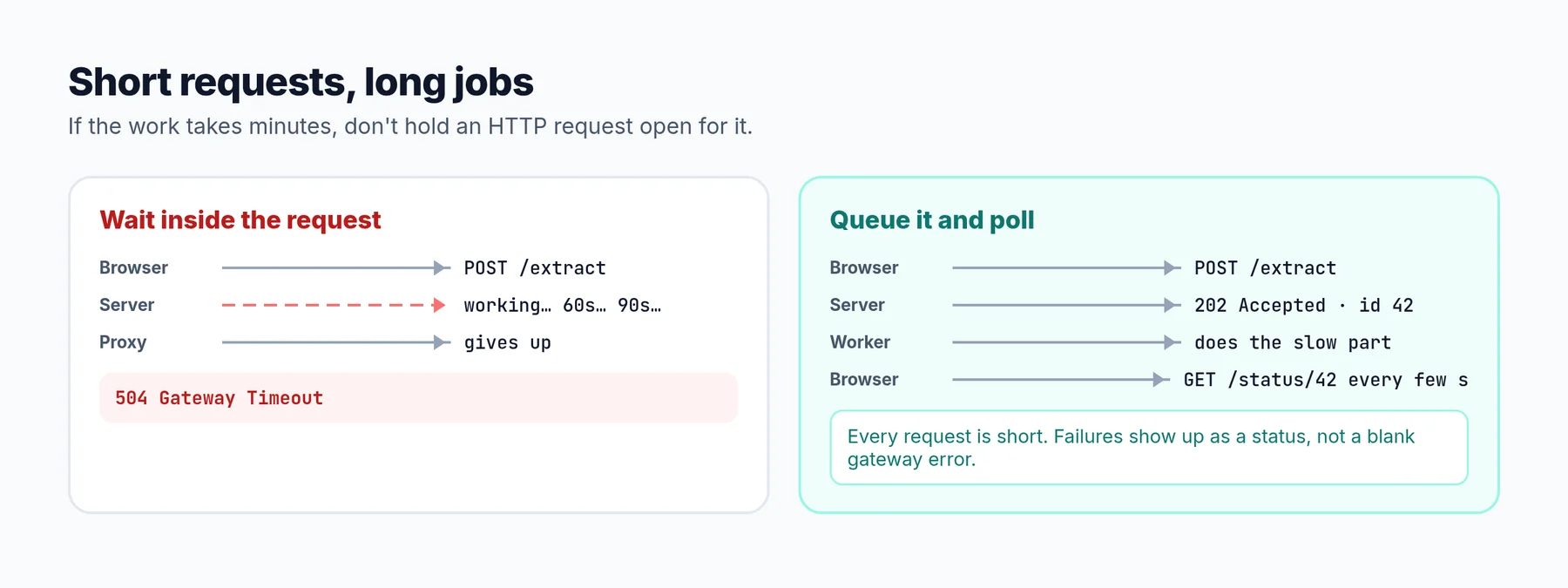 Short requests, long jobs.
- The browser sends the video link.
- The server saves a record, puts a job on a queue and returns immediately with an ID.
- A background worker does the slow part.
- The browser checks the status every few seconds and shows progress.
Now every HTTP request is short, the web server doesn't need huge timeouts, a slow job can't tie up web workers, and if something fails, the user sees it on the status page instead of a blank gateway error.
If your endpoint regularly takes more than a few seconds, it's worth asking whether it should be a job instead.
What I'm changing
Here is the list I came away with for YouExtractor. It works as a checklist for most apps:
- One deadline per extraction. The job decides the budget when it starts. Every AI call gets
min(time left, a cap), never a fresh 180 seconds. - Retry only temporary errors. No more retrying
400s. RespectRetry-Afteron429s. - Retries in one place. The HTTP client retries a dropped connection. The provider fallback handles a provider being down. The job doesn't retry on top of that when the budget is gone.
- Line up the queue numbers.
retry_afterlonger than the job timeout, so a slow job can never run twice. - Fail fast and clearly. When the budget runs out, mark the extraction as failed, refund the credit and tell the user what happened, in seconds rather than after 20 minutes.
A checklist for your own code
- Every outgoing HTTP call, database query and cache call has a timeout you chose on purpose.
- Connect timeouts are short (a few seconds).
- Long or streaming calls have a total deadline, not just a read timeout.
- Every inner timeout is shorter than the one around it.
- Retries only happen for temporary errors, with backoff and jitter, at one layer.
- Anything that isn't safe to repeat uses an idempotency key, or isn't retried.
- Queue
retry_after(or your queue's visibility timeout) is longer than the job timeout. - Work that takes more than a few seconds runs as a background job.
- You know the worst-case total time of your slowest request, and you've written it down.
That last one is the real test. If you can't say how long your slowest request can take in the worst case, add up the layers. You might be as surprised as I was.
Frequently asked questions
What is a good default timeout for an HTTP request?
There is no universal number, but a short connect timeout (2 to 5 seconds) and a total timeout of a few times the call's normal p99 latency is a good start. For a typical internal API, that's often 2 to 10 seconds. Measure, then adjust.
Should the timeout be the same for every call?
No. A health check, a database read and an AI generation have very different normal speeds. Give each one a timeout based on its own latency, and make sure they all fit inside the overall budget of the request or job.
What's the difference between a read timeout and a total timeout?
A read timeout limits the wait between pieces of data and usually resets every time data arrives. A total timeout limits the whole request from start to finish. A slow trickle of data can run forever under a read timeout, but not under a total timeout.
Are retries bad?
No, retries fix a lot of real, brief failures. They become a problem when they stack across layers, retry errors that can't succeed, or ignore the time budget. One layer, temporary errors only, with backoff and a deadline.
How do I find the timeouts in my codebase?
Search for your HTTP client, database and queue configuration: timeout, retry, connectTimeout, AbortSignal, context.WithTimeout, and your web server's proxy timeouts. Then draw the layers from the user inwards and write each number down. The gaps and the overlaps show up quickly.