
When you build an AI app, you end up on both sides of rate limiting at once.
On one side, your users send you requests. Every request to YouExtractor that turns a YouTube tutorial into a project costs real money in AI tokens. If someone sends a thousand of them, you pay for a thousand. On the other side, your app sends requests to AI providers, and they limit you. Send too many and you get 429 Too Many Requests, and your users get a slow or failed extraction.
So rate limiting isn't just a security checkbox. It decides what your app costs, how fair it is to your users, and how well it behaves when a provider is busy.
This article covers both sides: how to protect your own API, and how to be a good client of someone else's.
Short version: a rate limit controls how fast someone can make requests. A quota controls how many they get in total. A concurrency limit controls how many can run at once. You usually need more than one. Use a token bucket or sliding window, keep the counters in a shared store like Redis, limit by user (not just IP) where you can, and answer with
429plus aRetry-Afterheader. When you're the client, read the provider's limit headers and slow down before you hit them.
Three limits that are easy to mix up
People say "rate limit" for three different things. They solve different problems, so it's worth keeping them apart.
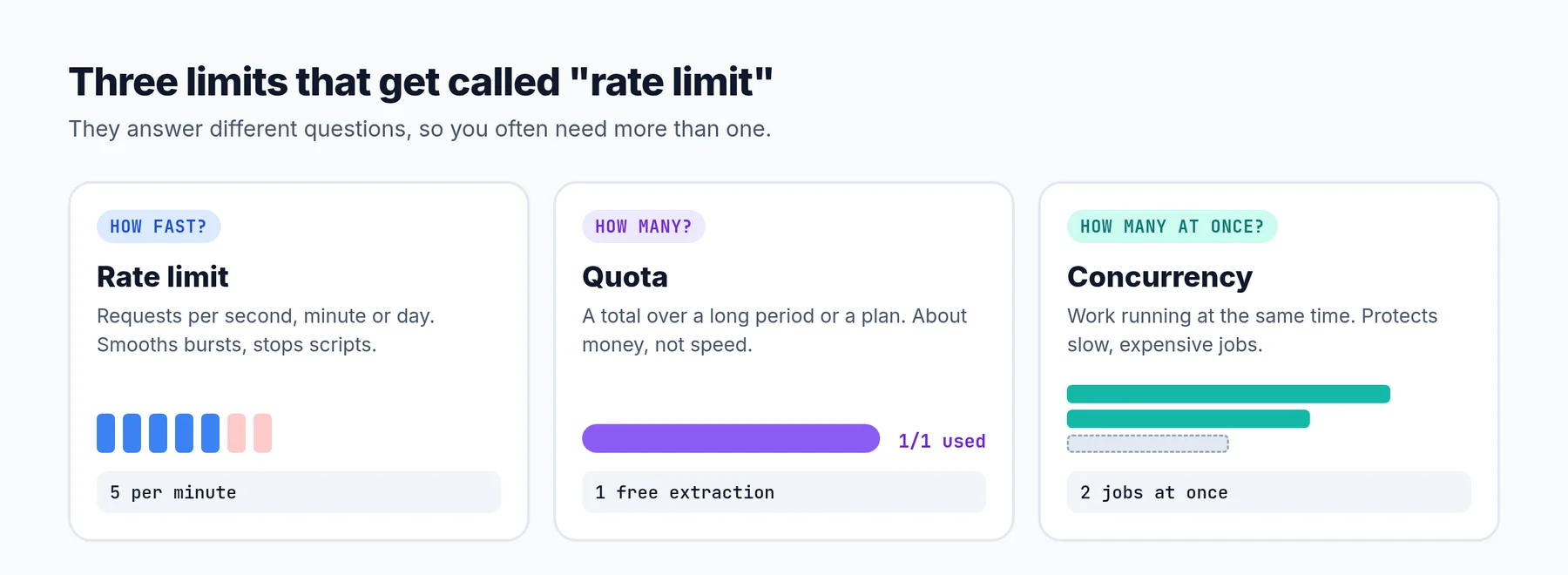 Same word, three different jobs.
- Rate limit: how fast. "5 requests per minute." It smooths out bursts and stops scripts from hammering an endpoint.
- Quota: how many in total. "One free extraction per account" or "100,000 tokens per month." It's about money and plans, not speed.
- Concurrency limit: how many at once. "Two extractions running at the same time per user." It protects slow, expensive work, where even a low request rate can pile up.
In YouExtractor, the extraction quota is the one that matters most. Every account gets one free extraction. After that you need credits or a Pro plan. That's a quota. But a quota alone doesn't stop someone from sending fifty requests in one second, and as you'll see later, it doesn't automatically stop two requests from both using the same free slot either.
Why rate limit at all
There are four good reasons, and they lead to different limits:
- Cost. If an endpoint calls a paid API, every request has a price. Without a limit, your bill is controlled by whoever sends the most requests.
- Abuse. Login forms get password-guessing attacks. Sign-up forms get bots. Search endpoints get scraped. A strict limit on these makes attacks slow enough to be pointless.
- Fairness. One heavy user shouldn't make the app slow for everyone else.
- Protecting what's behind you. Your database, your queue, and the APIs you depend on all have a capacity. A rate limit at the front is often cheaper than scaling everything behind it. (This ties into timeouts: when a dependency gets slow, requests pile up, and a limit stops the pile from growing forever.)
The algorithms, in plain words
There are a handful of standard ways to count requests. They differ in how they handle bursts, how much memory they use, and how fair they feel to users.
Fixed window
Count requests in fixed blocks of time: 12:00:00 to 12:00:59, then 12:01:00 to 12:01:59, and so on. If the count goes over the limit, reject until the next block starts.
It's the simplest one, and it has one well-known weakness: the boundary. With a limit of 5 per minute, someone can send 5 requests at 12:00:59 and 5 more at 12:01:00. That's 10 requests in two seconds, double the limit, and both windows think everything is fine.
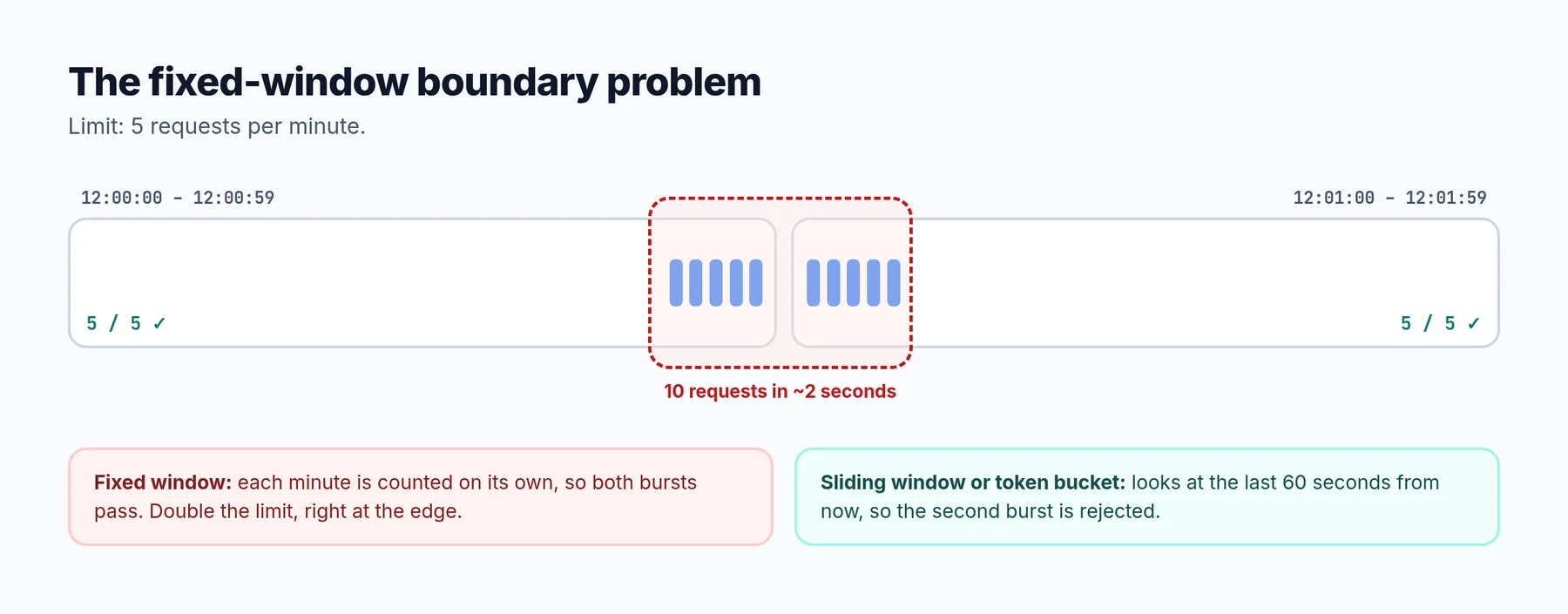 Fixed windows can let through twice the limit at the edges.
Sliding window
Instead of fixed blocks, look back over "the last 60 seconds" from right now. There are two common versions:
- Sliding log: store the timestamp of every request and count the ones in the last minute. Exact, but it uses memory for every single request.
- Sliding window counter: keep counts for the current and previous fixed window, and estimate. If you're 25% into the current minute, take 75% of the previous minute's count plus the current count. It's an approximation, but it's cheap and removes most of the boundary problem.
Token bucket
Picture a bucket that holds, say, 10 tokens. Every request takes one token. Tokens drip back in at a steady rate, say one every 6 seconds. If the bucket is empty, the request is rejected (or waits).
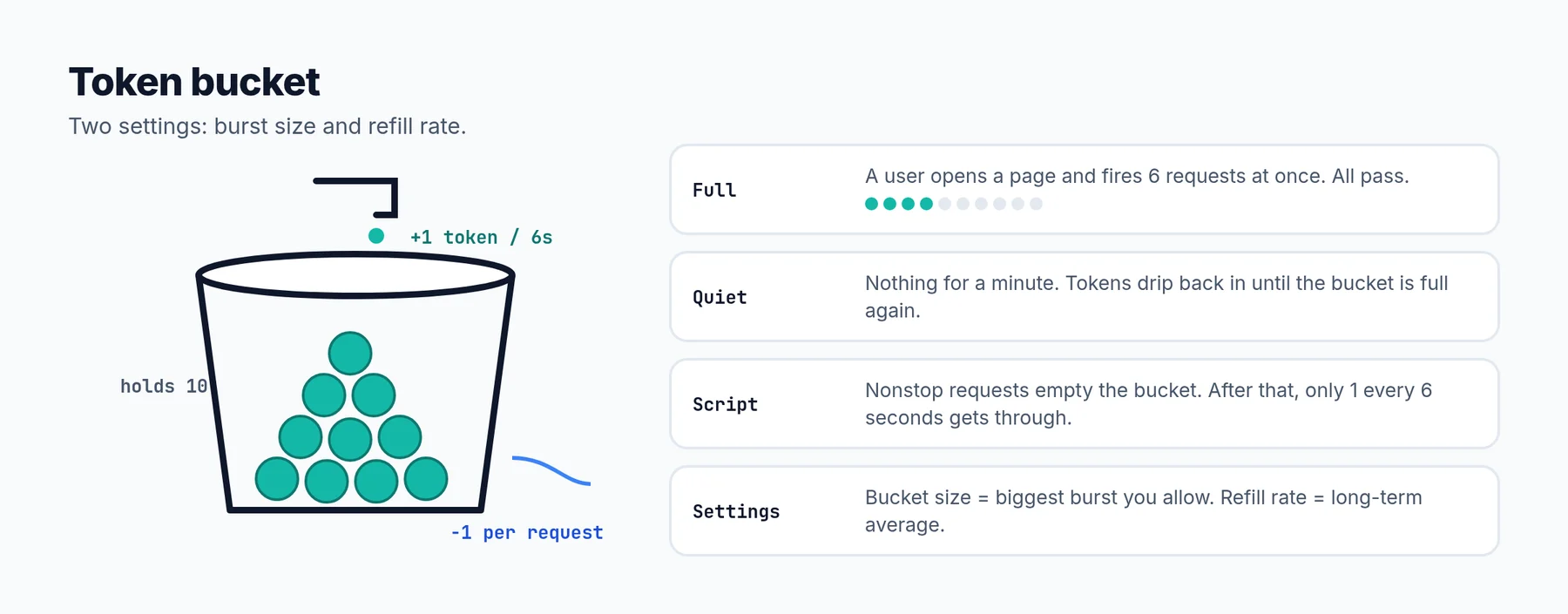 Two numbers: how big a burst you allow, and how fast it refills.
The nice thing about a token bucket is that it has two separate settings: the size of the bucket (how big a burst you allow) and the refill rate (the long-term average). That matches how real people use apps. Someone opens a page and fires five requests at once, then does nothing for a minute. A token bucket allows that, while still stopping a script that sends requests nonstop.
Leaky bucket
Requests go into a queue, and the queue is processed at a fixed rate, like water leaking out of a hole in a bucket. If the queue is full, new requests are rejected. This gives a perfectly smooth outgoing rate. It's less common for public APIs, but very useful on the client side, when you need to send requests to someone else at a steady pace. Nginx's limit_req works on this idea.
Which one should you use?
For most apps: a token bucket or sliding window counter, whichever your framework or gateway already gives you. Fixed windows are fine for rough limits where a short double burst doesn't matter. Use a leaky bucket (a queue) for your own outgoing calls to other APIs.
What to limit by
A limit needs a key: limit whom? This choice matters as much as the algorithm.
- By user or API key. The best option for anything behind a login. It's fair, and one user can't hide behind many IPs.
- By IP address. The only option for things like login and sign-up, where there's no user yet. But be careful: a whole office, school or mobile network can share one IP. Limits by IP should be generous, or combined with something else.
- By IP and account together. For login, limit by the email being tried and by IP. That stops one IP from guessing many passwords, and many IPs from guessing one account's password.
- By route or by cost. Not every endpoint is equal. Viewing a page is cheap. Starting an AI extraction isn't. Give expensive endpoints their own, stricter limit. For AI features, you can even limit by tokens used instead of requests.
Two traps with IPs:
- Behind a proxy, every request can look like it comes from the proxy. You need to read the real client IP from a header like
X-Forwarded-For, but only trust that header when it was set by your own proxy or CDN. Otherwise anyone can send a fake one and get a fresh limit every time. - IPv6. One person can easily have a huge range of IPv6 addresses. Limiting by the exact address doesn't work well. Limit by the network prefix (commonly a
/64) instead.
Where to put the limit
You can enforce limits in a few places, and using more than one is normal:
- At the edge (CDN, load balancer, Nginx). Very cheap, because blocked requests never reach your app. Good for broad limits by IP and for blocking floods.
- In your app. Slower, but it knows who the user is, what plan they're on and what the request costs. Good for per-user, per-plan and per-route limits.
Keep the counters in one shared place
If you run more than one server or container, the counters must live in a shared store, usually Redis. If each server keeps its own count, a limit of 5 per minute on three servers is really 15 per minute.
The counting also has to be atomic. "Read the count, add one, write it back" in three steps lets two requests both read 4 and both decide they're allowed. Use an atomic operation like Redis INCR, or a small Lua script for more complex algorithms.
# Fixed window with Redis, atomic: INCR returns the new count.
def allow(redis, key: str, limit: int, window_seconds: int) -> bool:
    bucket = f"rl:{key}:{int(time.time()) // window_seconds}"
    count = redis.incr(bucket)
    if count == 1:
        redis.expire(bucket, window_seconds)
    return count <= limit
Rate limiting in Laravel
Laravel has this built in. You define named limiters and attach them to routes with the throttle middleware. The counts are stored in your cache, so use Redis in production for the reasons above.
// app/Providers/AppServiceProvider.php
use Illuminate\Cache\RateLimiting\Limit;
use Illuminate\Support\Facades\RateLimiter;

public function boot(): void
{
    // Expensive AI work: per user, short-term and daily.
    RateLimiter::for('extract', fn (Request $request) => [
        Limit::perMinute(3)->by($request->user()->id),
        Limit::perDay(50)->by($request->user()->id),
    ]);

    // Login: by email and by IP, so neither can be used to get around the other.
    RateLimiter::for('login', fn (Request $request) => [
        Limit::perMinute(5)->by(strtolower($request->input('email')).'|'.$request->ip()),
        Limit::perMinute(20)->by($request->ip()),
    ]);
}
// routes
Route::post('/videos/extract', [VideoController::class, 'extract'])->middleware('throttle:extract');
Route::post('/signin', [AuthController::class, 'signin'])->middleware('throttle:login');
When a limit is hit, Laravel returns a 429 with Retry-After and X-RateLimit-* headers for you.
And in Nginx
# 10 MB of memory holds state for roughly 160,000 IPs.
limit_req_zone $binary_remote_addr zone=login:10m rate=5r/m;

server {
    location = /signin {
        limit_req zone=login burst=5 nodelay;
        limit_req_status 429;   # the default is 503, which looks like an outage
        proxy_pass http://app;
    }
}
One detail worth knowing: Nginx rejects with 503 by default. To clients and monitoring, a 503 looks like your server is down. Set limit_req_status 429 so it's clear the client is being limited.
How to say no properly
A good rate limit response tells the client three things: you were limited, when you can try again, and how much room you have.
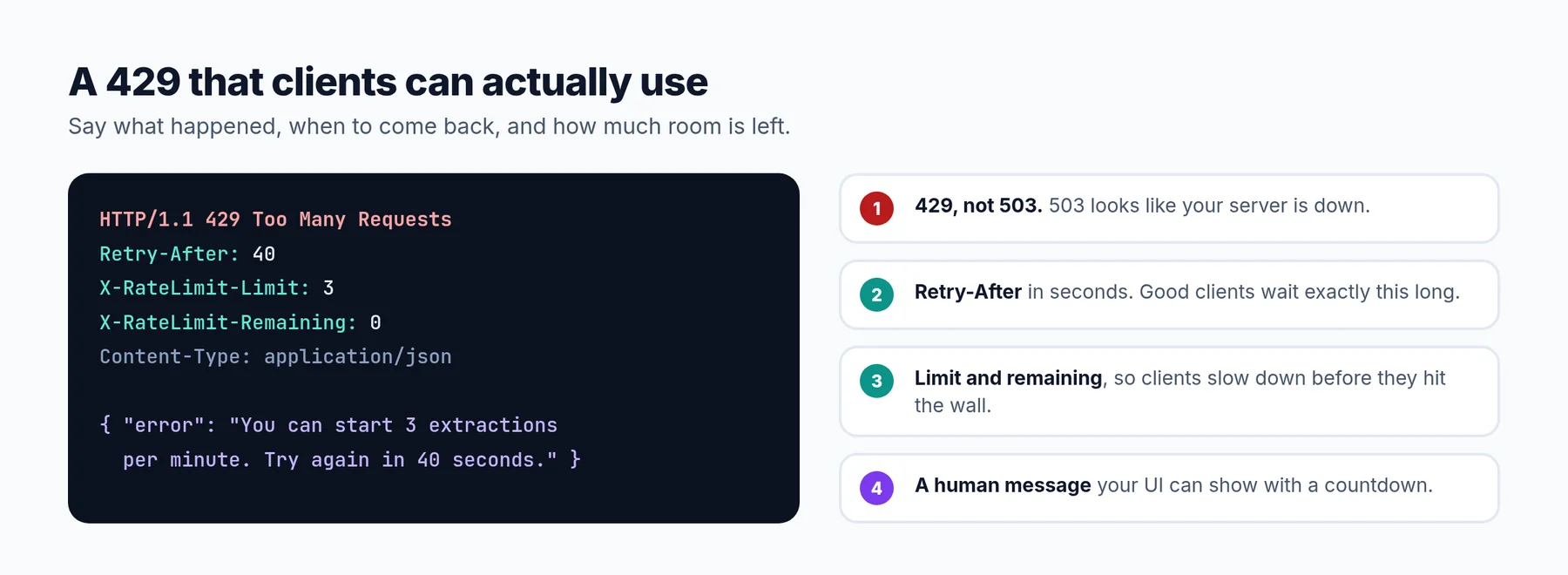 Clients can only slow down correctly if you tell them how.
- Use
429 Too Many Requests, not400,403or503. Well-behaved clients and libraries treat 429 as "wait and retry". - Send
Retry-Afterwith the number of seconds to wait. This is the single most useful header. Good clients will wait exactly that long instead of guessing. - Send remaining-quota headers like
X-RateLimit-LimitandX-RateLimit-Remaining, so clients can slow down before they get blocked. There's also an IETF draft that standardizesRateLimitandRateLimit-Policyheaders for the same purpose. - Write a human message. "You can start 3 extractions per minute. Try again in 40 seconds." is much better than "Too Many Attempts."
- Show it in your UI. If your own frontend gets a 429, show a friendly message with a countdown, not a generic error.
The race condition nobody tests: quotas and double clicks
Here's a bug that rate limiting alone doesn't fix.
Imagine the extraction endpoint does this:
- Check if the user still has their free extraction.
- If yes, start the extraction.
- When it finishes, mark the free extraction as used.
Now the user double-clicks, or a script sends two requests at the same moment. Both requests run step 1 before either reaches step 3. Both see "free extraction available". Both start. The user just got two free extractions, and with a script, they could get twenty.
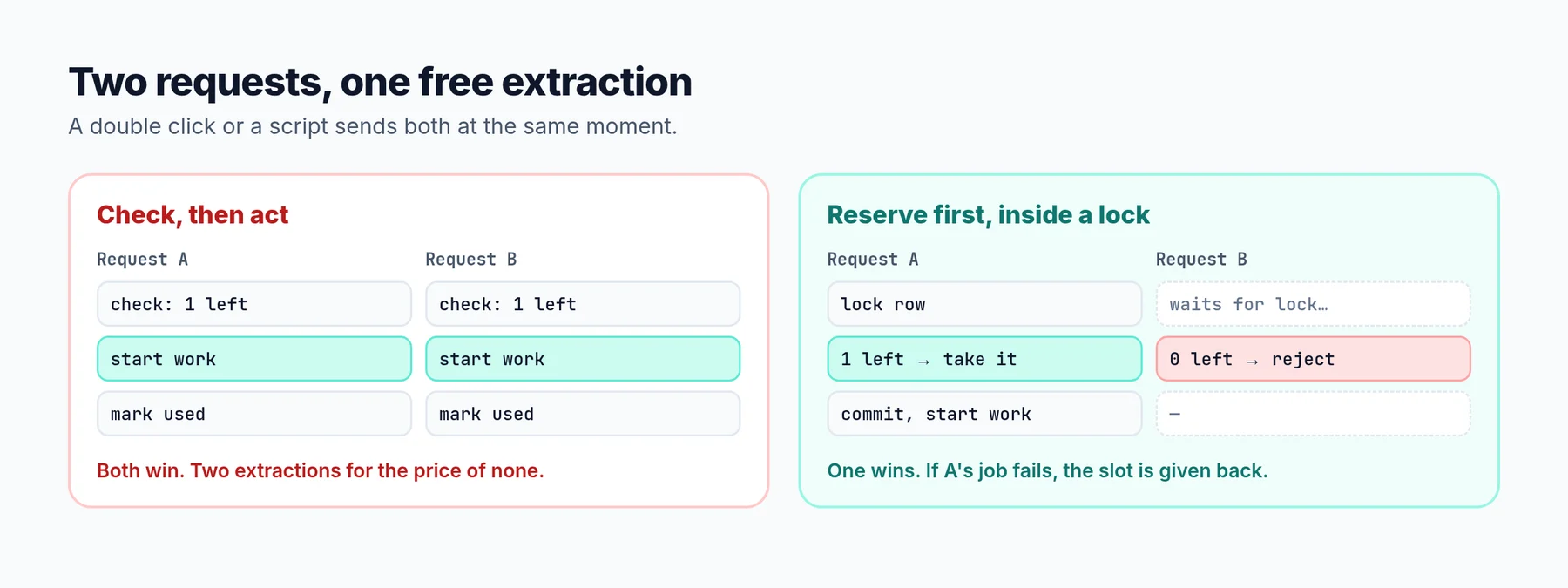 Two requests, one free slot. Without a lock, both win.
This is called a check-then-act race, and it's everywhere quotas and credits exist. The fix is to make "check" and "use" one atomic step, and to do it before the work starts:
// Reserve one extraction before the work starts, inside a row lock.
public function consumeExtraction(): ?string
{
    return DB::transaction(function () {
        $fresh = User::whereKey($this->id)->lockForUpdate()->first();

        if (! $fresh->canExtract()) {
            return null;            // nothing left: reject the request
        }

        if ($fresh->credits > 0) {
            $fresh->decrement('credits');
            return 'credit';
        }

        $fresh->increment('free_extractions_used');
        return 'free';
    });
}
This is close to what YouExtractor actually does. lockForUpdate() makes the second request wait until the first one has committed. By then the slot is gone, so the second request is rejected. And because the extraction is reserved up front, there's a matching step that gives it back if the job fails, so users aren't charged for an extraction that never produced anything.
Two takeaways:
- Reserve first, refund on failure. Don't wait until the work is done to count it.
- Rate limits and quotas work together. The quota decides how many you get. The lock makes sure that count is correct. A per-minute rate limit on top stops someone from even trying fifty times a second.
The other side: when you're the one being limited
Now flip it around. Your app calls AI providers, and they limit you. Most AI APIs limit both requests per minute and tokens per minute, and some limit input and output tokens separately. A single large prompt can use up a token limit long before you hit the request limit.
When you go over, you get a 429. What you do next decides whether your users notice.
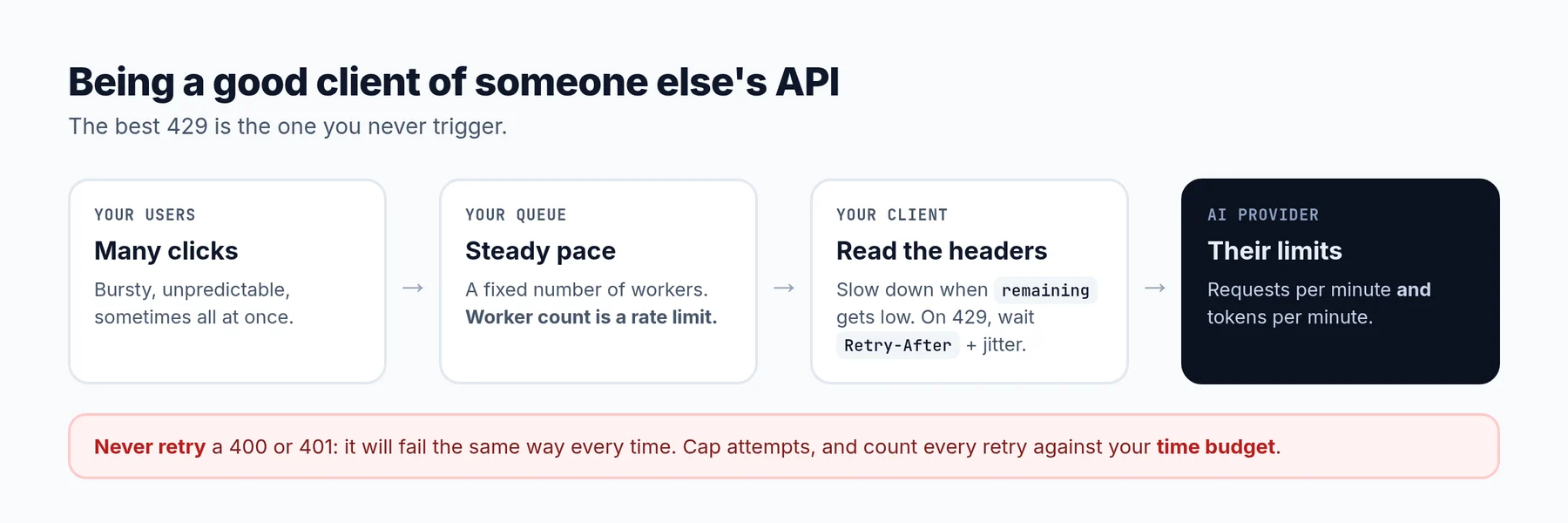 The best 429 is the one you never trigger.
Respect Retry-After
If the provider tells you when to come back, wait that long. Our Gemini integration waits a fixed 5, 10 and then 15 seconds after a 429. That works, but it's a guess. If the provider says "come back in 2 seconds", we wait too long. If it says 30, we come back too early and get limited again. Reading the header is both faster and more polite.
Back off with jitter
When there's no Retry-After, use exponential backoff (1s, 2s, 4s...) with some randomness added. Without the randomness, all your workers that got limited at the same moment come back at the same moment and get limited again together.
Slow down before you hit the wall
Many providers send headers with how many requests and tokens you have left. If you read them, you can slow down when you're close to the limit instead of crashing into it. Even simpler: put your outgoing calls through a queue with a fixed number of workers. The number of workers is a rate limit. With 2 workers and calls that take about 30 seconds, you can't send more than about 4 calls a minute, no matter how many users click at once.
Fall back, but carefully
If one provider is limiting you, switching to another one is a reasonable move. YouExtractor can fall back between several AI providers for exactly this reason. Just remember the lesson from the timeouts article: every fallback and retry spends time from the same budget. Retrying a 429 three times on four providers can turn a short wait into a very long one.
Don't retry what won't succeed
A 429 is worth retrying. A 400 Bad Request or 401 Unauthorized is not. It will fail the same way every time.
Picking the actual numbers
Like timeouts, rate limits are easy to set and hard to set well. Some guidelines:
- Look at real usage first. How many requests does a normal, active user make per minute? Set the limit comfortably above that, so real people almost never see it.
- Be strict where it's expensive or sensitive. AI calls, login, sign-up, password reset, sending emails. These can have low limits, because normal users rarely need many.
- Be generous where it's cheap. Reading pages and listing your own data rarely needs a tight limit.
- Combine a short and a long limit. "3 per minute and 50 per day" stops both fast bursts and slow, steady abuse.
- Watch your 429s. If real users hit a limit often, it's too low. If you never see any 429s at all, check that the limit is actually switched on.
A checklist
- Every endpoint that costs money (AI, email, SMS) has a per-user rate limit.
- Login, sign-up and password reset are limited by IP and by account.
- Counters live in a shared store (Redis), and increments are atomic.
- Real client IPs come from a header your own proxy sets, not one the client can fake.
- Limited requests get
429,Retry-Afterand a clear message. - Quotas and credits are reserved inside a lock before work starts, and refunded on failure.
- Expensive background work has a concurrency limit (worker count or per-user cap).
- Calls to other APIs respect
Retry-After, use backoff with jitter, and never retry4xxerrors other than 429. - You have a dashboard or log of 429s, both the ones you send and the ones you receive.
Frequently asked questions
What's the difference between rate limiting and throttling?
People often use them to mean the same thing. When there is a difference, rate limiting usually means rejecting requests over the limit, and throttling means slowing them down (queuing or delaying) instead. Laravel's throttle middleware actually rejects with a 429.
Should I rate limit by IP or by user?
By user whenever you can, because it's fair and harder to get around. Use IP for things that happen before login, like sign-in and sign-up, and keep IP limits generous enough for people sharing a network.
Which rate limiting algorithm is best?
For most APIs, a token bucket or a sliding window counter. Both handle bursts well and are cheap to run. Fixed windows are simpler but can let through twice the limit at window boundaries.
What HTTP status code should a rate limit return?
429 Too Many Requests, with a Retry-After header. Avoid 503, which tells clients and monitoring tools that your service is down.
Do I still need a quota if I have a rate limit?
Yes, if usage is tied to money or plans. A rate limit controls speed, so someone could still use far more than they paid for, just slowly. A quota controls the total. And protect the quota with a lock, or two requests at the same time can both get through.